Accessibility Documentation System
150+ Criteria Checklist for Foleon & AEM
Creating comprehensive accessibility documentation covering WCAG 2.2, EAA compliance, and platform-specific considerations. From international standards research to actionable checklists — enabling teams to build inclusive digital experiences.
WCAG 2.2 Level AA
Research + Checklist System
Context & Challenge
No Unified Accessibility Standard for Digital Publishing
The team was creating interactive digital publications using Foleon and AEM, but there was no comprehensive accessibility guidance tailored to these platforms. Generic WCAG checklists didn't address platform-specific limitations — like Foleon's content gates, hotspots, and scroll buttons that create unique accessibility challenges.
With the European Accessibility Act (EAA) now active since June 2025, compliance wasn't optional. The team needed a complete accessibility framework that covered international standards, legal requirements, and practical platform-specific guidance they could actually use.
The European Accessibility Act became enforceable June 2025. Digital products and services must now meet EN 301 549 standards or face legal consequences.
Foleon has known accessibility limitations — content gates, GIFs, text spacing issues — that generic WCAG guides don't address.
The team had access to WCAG documentation, but needed a practical checklist organized by workflow — not abstract success criteria.
WCAG 2.2, WAI-ARIA, ATAG, Section 508, EAA — teams needed to understand how these standards relate and which apply to their context.
adjustMy Brief
Research all relevant accessibility standards and methodologies. Analyze platform-specific capabilities and limitations for Foleon and AEM. Create comprehensive documentation and an actionable checklist that teams can use throughout the content creation workflow.
Key Decisions
Strategic Choices That Shaped the Documentation
| Decision | What I Chose | Why | Tradeoff |
|---|---|---|---|
| Documentation structure | Two-document approach: Research + Checklist | Separates strategic understanding from operational execution — teams need both | Two documents to maintain, but each serves a clear purpose |
| Checklist organization | By workflow stage, not by WCAG criterion | Teams work in phases (pre-production, content, testing) — organizing by workflow makes the checklist actionable | Less direct WCAG mapping, but much more practical for daily use |
| Platform focus | Foleon-first with AEM coverage | Foleon has unique constraints (content gates, hotspots) that generic checklists miss entirely | Less applicable to other platforms, but much more useful for the target team |
| Compliance scope | WCAG 2.2 AA as baseline, EAA as legal framework | EAA is now enforceable, and AA is the most commonly required conformance level | AAA items included as stretch goals, not requirements |
Research Phase
10 Sections of Accessibility Standards Research
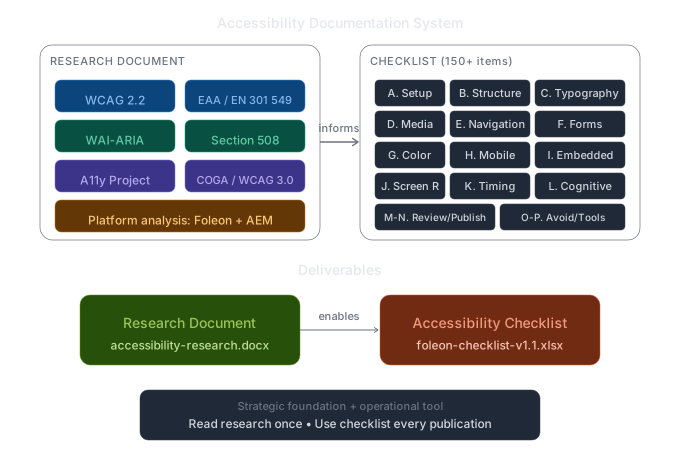
The first deliverable was a comprehensive research document covering all relevant accessibility standards, legal frameworks, and methodologies. This became the foundation for the actionable checklist.
International Standards
WCAG 2.2 (current), WCAG 2.1, WCAG 3.0 (draft with Bronze/Silver/Gold), WAI-ARIA, ATAG, UAAG
Legal Frameworks
EAA (active June 2025), EN 301 549, Section 508, ADA, UK/Canada/Israel/Norway regional laws
Methodologies
A11y Project, Inclusive Design, Accessibility Maturity Models, Shift-Left practices
Testing Pyramid
Automated (axe-core, WAVE, Lighthouse) → Manual screen reader → User testing with PwD
Platform Analysis
Foleon capabilities/limitations, AEM features, ACR-documented gaps
Standards Map
Visual showing WCAG → Section 508, EN 301 549, EAA, ADA relationships
Emerging Frameworks
COGA, APCA contrast algorithm, ACT Rules, PDF/UA
Applicability Matrix
Quick-reference mapping every standard to Foleon and AEM
descriptionResearch Document Output
The research document (accessibility-research.docx) covers all 10 sections with full references to primary sources. It serves as the strategic foundation — explaining not just what the standards are, but how they relate to each other and which apply to Foleon/AEM specifically.
Checklist System
16 Sections, 150+ Review Points
The checklist transforms abstract WCAG success criteria into actionable review points organized by workflow stage. Each item is mapped to its WCAG criterion and priority level (Critical → Low).
| Section | Focus Area | Items |
|---|---|---|
| A. Pre-Production Setup | Doc settings, language, Brand Kit, color palette | 14 |
| B. Content Structure | Heading hierarchy, reading order, language | 13 |
| C. Text & Typography | Resize, spacing, reflow, plain language | 7 |
| D. Images & Media | Alt text, video captions, audio transcripts, GIF handling | 18 |
| E. Navigation & Interaction | Keyboard access, nav bar, links, buttons, Foleon-specific features | 27 |
| F. Forms & Input | Labels, errors, required fields, authentication | 11 |
| G. Color & Visual Design | Contrast ratios, color-only information, focus indicators | 8 |
| H. Responsive & Mobile | Reflow, touch targets, gestures, device equivalence | 8 |
| I. Embedded Content | iframes, cookie consent, PDFs, social widgets | 6 |
| J. Screen Reader | Semantic HTML, ARIA, NVDA/VoiceOver testing | 8 |
| K. Timing & Auto-Updates | Time limits, auto-play, interruptions | 4 |
| L. Cognitive Accessibility | COGA and WCAG 3.0 preview items | 9 |
| M. Pre-Publish Review | Automated + manual testing protocol | 10 |
| N. Post-Publish | Accessibility statement, VPAT, re-audit schedule | 7 |
| O. Features to Avoid | Foleon features that fail accessibility | — |
| P. Testing Tools | Tool reference with URLs | — |
| Total Review Points | 150+ | |
Platform-Specific Analysis
Foleon Features: Risk Assessment
Section E of the checklist includes 10 Foleon-specific feature risk assessments. These are interactive features that require special attention because they can create accessibility barriers if not implemented correctly.
Form overlays that lock content until submitted. Risk: may trap keyboard focus, lack proper ARIA roles, or prevent screen reader access to gated content.
Interactive image areas revealed on hover/click. Risk: may not be keyboard accessible, lack visible focus indicators, or have unclear purpose for screen readers.
Navigation buttons for scrolling between sections. Risk: may not announce destination, could confuse screen reader navigation context.
In-page navigation to specific sections. Risk: focus management after jump, maintaining reading context for assistive technology.
Animated images that loop continuously. Risk: no pause mechanism, can trigger vestibular disorders or seizures if flashing.
Foleon's text rendering. Risk: users who need increased text spacing (WCAG 1.4.12) may not be able to apply their preferences.
lightbulbFeatures to Avoid or Use With Caution
The checklist includes Section O: "Features to Avoid" — a quick-reference table of Foleon features that commonly fail accessibility and should either be avoided entirely or used only with specific mitigations in place.
Testing Resources
Recommended Testing Tools
Section P of the checklist provides a complete testing toolkit reference. These tools cover the full testing pyramid from automated scanning to manual assistive technology testing.
- axe DevTools (browser extension)
- WAVE Evaluation Tool
- Lighthouse (Chrome)
- Pa11y (CI integration)
- ANDI (Section 508)
- NVDA (Windows, free)
- VoiceOver (Mac/iOS, built-in)
- JAWS (Windows, enterprise)
- TalkBack (Android)
- Narrator (Windows)
- Colour Contrast Analyser
- Stark (Figma plugin)
- WebAIM Contrast Checker
- Sim Daltonism (color blindness)
- APCA Calculator (WCAG 3.0)
Final Deliverables
Research Document + Actionable Checklist
The project produced two complementary deliverables: a comprehensive research document explaining the accessibility landscape, and an actionable checklist for day-to-day use.
Research Document
10 sections covering international standards, legal frameworks, methodologies, testing techniques, platform analysis, emerging frameworks, and strategic recommendations. Full references to primary sources.
Accessibility Checklist
foleon-accessibility-checklist-v1.1.xlsx
150+ review points across 16 sections. Each item mapped to WCAG criterion and priority level. Includes audit summary template for tracking results.
tips_and_updatesHow to Use Together
The research document is the strategic foundation — read it once to understand the accessibility landscape and why each requirement matters. The checklist is the operational tool — use it for every publication to ensure nothing is missed. Together, they enable teams to build accessibility into their workflow rather than treating it as an afterthought.
Results & Impact
A Complete Accessibility Framework
Review Points
Actionable checklist
Checklist Sections
Workflow-organized
Standards Covered
Unified framework
Platform Analysis
Foleon + AEM specific
Deliverables
10-section strategic foundation covering all standards
150+ review points with WCAG mapping
Tracking sheet for compliance scoring
Foleon and AEM capability mapping
Reflections