Accessibility Framework — Foleon & AEM at Marsh
Research, documentation, and an actionable 150+ item checklist for platform-specific accessibility at Marsh — covering WCAG 2.2 AA, the European Accessibility Act, and the known limitations of Foleon and AEM that generic checklists don't address. Part of the broader CX Blueprint work.
Context & Challenge
No Platform-Specific Accessibility Guidance for Foleon or AEM
Marsh's digital content team produced interactive publications using Foleon and AEM — but had no accessibility framework tailored to these platforms. Generic WCAG checklists didn't account for Foleon-specific features like content gates, hotspots, and scroll buttons that create unique barriers for keyboard and screen reader users.
With the European Accessibility Act active since June 2025, compliance wasn't optional. Marsh needed a complete framework — international standards research, legal requirements, and practical platform-specific guidance teams could use from day one of production. This was a direct extension of the CX Blueprint project, embedding accessibility into every phase of the content workflow.
The European Accessibility Act became enforceable in June 2025. Digital products must meet EN 301 549 (which maps to WCAG 2.2 AA) or face legal risk — including fines up to 2% of EU annual turnover.
Content gates lock keyboard access, hotspots are not keyboard-navigable, and Foleon's branding element cannot be targeted. Generic WCAG checklists don't flag these platform-specific failures.
Three live Marsh publications were reviewed during production — Cyber Catalyst CX Review, Aviation Review, and Talent Trends — each surfacing new accessibility failures that informed the v1.1 checklist update.
Teams had access to WCAG documentation but needed a checklist organized by production workflow — not by abstract success criteria. Pre-production, content, testing, and compliance need separate checklists.
adjustMy Brief
Research all relevant accessibility standards and legal frameworks. Analyze platform-specific capabilities and limitations for Foleon and AEM. Produce a comprehensive research document (PDF) and an actionable checklist (XLSX) that content teams can use throughout every publication — from initial Doc setup through post-publish compliance documentation. Update the checklist as real project audits reveal new failure patterns.
Key Decisions
Strategic Choices That Shaped the Framework
| Decision | What I Chose | Why | Tradeoff |
|---|---|---|---|
| Documentation structure | Two-document approach: Research PDF + Checklist XLSX | Teams need to understand why (the research) and how (the checklist). Combining them creates documents too long to use daily | Two files to maintain — but each serves a clear, different purpose |
| Checklist organization | By workflow stage (Pre-Production → Content → Testing → Compliance), not by WCAG success criterion | Teams work in phases, not in WCAG chapters. Organizing by workflow makes each section immediately actionable without cross-referencing the standard | Less direct WCAG mapping per item, but dramatically more practical for daily use |
| Platform focus | Foleon-first with AEM coverage, not generic | Content gates, hotspots, and Foleon's text-resize limitation are unique failures that generic checklists miss entirely. Platform-specific guidance is more valuable than comprehensive generic | Less applicable to other platforms — intentionally, to maximize usefulness for the target team |
| Compliance scope | WCAG 2.2 AA as baseline, EAA as legal framework, AAA as stretch | EAA is now enforceable and references EN 301 549 which maps to WCAG 2.2 AA. AA is the most commonly required conformance level across enterprise | AAA items included in checklist but labeled as stretch goals — not blocking requirements |
| Live audit feedback loop | v1.1 updates from real Marsh project audits | Theoretical checklists miss real-world patterns. Three live Marsh publications revealed new failure types (H1 split across elements, animated counter DOM values, inconsistent CTA text) | Checklist evolves — teams need to track which version they used for each publication audit |
Research Document
Standards & Legal Framework — Foleon / AEM Applicability
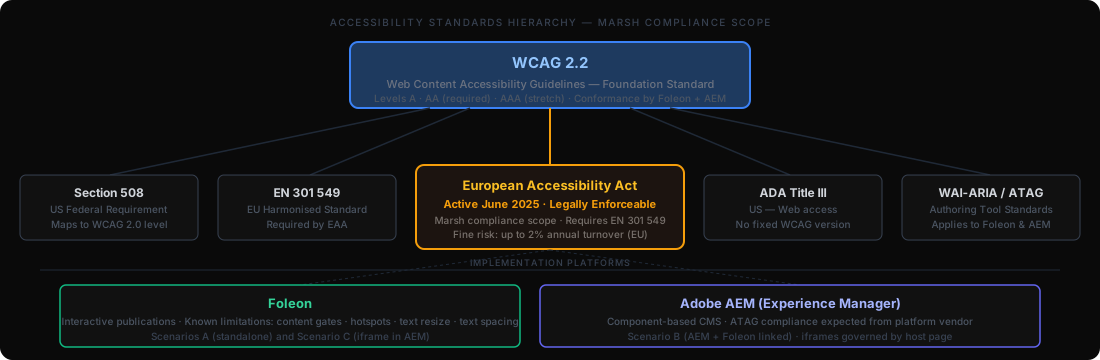
The research document (Foleon - AEM - Accessibility - Research.pdf) maps every major accessibility standard to Foleon and AEM's specific capabilities and limitations. It covers international standards, legal frameworks, methodologies, and an applicability matrix showing which requirements apply to which platform.
International Standards
WCAG 2.2 (current), WCAG 2.1, WCAG 3.0 draft (Bronze/Silver/Gold), WAI-ARIA, ATAG, UAAG — with conformance levels explained
Legal Frameworks
EAA (active June 2025), EN 301 549, Section 508, ADA Title III — plus UK, Canada, Israel, and Norway regional accessibility laws
Methodologies
A11y Project, Inclusive Design, Accessibility Maturity Models, Shift-Left practices — embedding accessibility from design rather than retrofitting at launch
Testing Pyramid
Automated scanning (axe-core, WAVE, Lighthouse) → Manual keyboard + screen reader → User testing with people with disabilities
Foleon Platform Analysis
Known limitations: text resize (1.4.4), text spacing (1.4.12), focus indicators (2.4.11), label association (F2). ACR-documented gaps from Foleon VPAT v2.5
AEM Platform Analysis
Component-based CMS. ATAG compliance expected from vendor. Scenario B (Foleon linked) and Scenario C (iframe embed) each require different accessibility approaches
Emerging Frameworks
COGA cognitive accessibility guidelines, APCA contrast algorithm (WCAG 3.0 preview), ACT Rules for test consistency, PDF/UA for tagged documents
Applicability Matrix
Quick-reference table mapping every standard (WCAG, EAA, Section 508, ADA) to Foleon and AEM — showing which criteria apply, which are handled by the platform, and which require author action
Checklist System
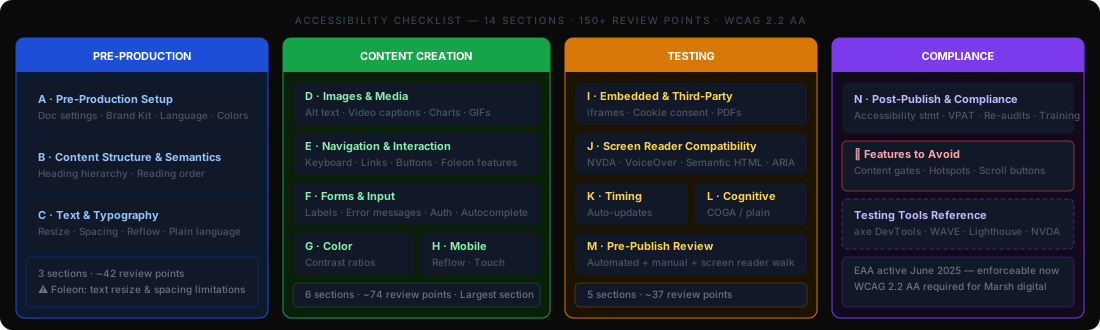
14 Sections · 150+ Review Points · Workflow-Organized
The checklist (foleon-accessibility-checklist-v1.1.xlsx) transforms abstract WCAG success criteria into actionable review points organized by production stage. Each item is mapped to its WCAG criterion and priority level (Critical / High / Medium / Low). Includes separate sheets for Features to Avoid and Testing Tools reference.
| Phase | Section | Focus Area | Items |
|---|---|---|---|
| Pre-Production | A · Pre-Production Setup | Doc settings, language, Brand Kit, color palette, nav structure | 18 |
| B · Content Structure & Semantics | Heading hierarchy, reading order, single H1, language attributes | 14 | |
| C · Text & Typography | Resize, spacing, reflow at 320px, plain language, abbreviations | 9 | |
| Content Creation | D · Images & Media | Alt text, video captions, charts/graphs, GIFs, animated counters | 22 |
| E · Navigation & Interaction | Keyboard access, links, buttons, Foleon-specific features risk assessment | 30 | |
| F · Forms & Input | Labels, error messages, required fields, authentication, autocomplete | 11 | |
| G · Color & Visual Design | Contrast ratios (4.5:1 normal / 3:1 large), focus indicators, color-only info | 9 | |
| H · Responsive & Mobile | Reflow, touch targets ≥24px, gestures, above-the-fold, chart alignment | 11 | |
| I · Embedded & Third-Party | iframes, cookie consent (Osano), PDFs, social widgets, external links | 6 | |
| Testing | J · Screen Reader Compatibility | Semantic HTML, ARIA, NVDA+Firefox, VoiceOver+Safari testing | 8 |
| K · Timing & Auto-Updates | Time limits, auto-play, auto-updating content, interruptions | 4 | |
| L · Cognitive Accessibility | COGA items: clear language, consistent layouts, unambiguous dates | 9 | |
| M · Pre-Publish Review | Automated + manual testing protocol: axe, keyboard, screen reader, zoom | 10 | |
| Compliance | N · Post-Publish & Compliance | Accessibility statement, VPAT/ACR, re-audit schedule, author training | 11 |
| Total Review Points (v1.1) | 150+ | ||
infoChecklist Structure — 5 Sheets
The XLSX has 5 sheets: Checklist (the 14 sections above), Audit Summary (tracking template for each publication: Pass / Fail / Partial / N/A), Changelog v1.0→v1.1 (all additions from real-world Marsh project audits), Features to Avoid (Foleon-specific failures with alternatives), and Testing Tools (tool reference with URLs). The Audit Summary sheet enables teams to record conformance scores and sign off before publish.
v1.1 Updates — Live Audit Feedback
Three Marsh Projects Improved the Checklist
v1.0 was built from standards research. v1.1 was built from practice — auditing three live Marsh publications during production revealed failure patterns that generic standards don't document. Each project fed new items back into the checklist.
Navigation had more than 7 items, creating cognitive load and keyboard navigation complexity. 'Home' label caused screen readers to announce the publication as a website rather than a document.
- A1.9 — Max 7 nav items; combine pages where possible
- A1.10 — Rename 'Home' to 'Introduction'
- A1.11 — Verify no outdated entity references
- A2.7 — CTA button contrast check specifically
H1 heading was split across two separate text blocks — visually appearing as one heading but read by screen readers as two distinct headings, breaking document structure. Several CTAs used identical text across different destinations.
- B1.7 — H1 must not be split into multiple text blocks
- B1.8 — H2 usage consistent across all pages
- B1.9 — Title alignment consistent across report
- E3.8 — Identical CTA text differentiated with destination
Data-heavy publication with animated percentage counters that rendered '0%' in the DOM — screen readers announced meaningless values. Bar chart labels and pie chart colors failed contrast and color-only distinction requirements.
- D5.1–D5.8 — Charts/graphs require text alternatives
- D5.6 — Animated counters render final value in DOM
- G9 — Chart segment colors meet 1.4.1 / 1.4.11
- H9–H11 — Chart alignment and scroll in mobile
Platform-Specific Analysis
Foleon Features to Avoid — Accessibility Failures
Section E of the checklist includes a Foleon feature risk matrix (E4.1–E4.9). Seven features are either confirmed accessibility failures (❌) or require manual testing and mitigation (⚠). These are documented in a separate "Features to Avoid" sheet with alternatives for each.
| Feature | Status | Failure | Alternative |
|---|---|---|---|
| Content Gates | ❌ Will NOT pass | Keyboard focus only reachable after traversing all links behind the gate | Ungated content or accessible form outside the gate |
| Hotspots | ❌ Will NOT pass | Not keyboard-accessible; not screen reader optimized | Standard buttons or links adjacent to the content |
| Page Scroll Button | ❌ No keyboard control | Cannot be operated with keyboard alone | Standard keyboard scrolling via page/arrow keys |
| Anchor Links | ❌ Focus doesn't follow | Keyboard focus does not move to target after anchor jump | Heading navigation; table of contents with visible links |
| Foleon Branding | ❌ Not targetable | The Foleon branding element cannot be reached via keyboard | Disable in Doc settings before publishing |
| GIFs as Backgrounds | ❌ Cannot be paused | Background GIFs loop indefinitely — no pause mechanism available | Use GIFs as image elements with controls, or use static images |
| Non-Centered-Logo Nav | ⚠ Not fully audited | Accessibility of non-standard nav patterns not formally reviewed | Use top nav bar with centered logo (only audited accessible pattern) |
| Column Scroll | ⚠ Test manually | Scrollable column containers require manual keyboard testing per use | Expose all content without horizontal scroll where possible |
lightbulbKnown Platform Limitations
Beyond the "Features to Avoid," Foleon has known limitations documented in its VPAT v2.5: text resize (WCAG 1.4.4 — content may not scale to 200%), text spacing (WCAG 1.4.12 — user-defined spacing overrides not supported), focus indicators (WCAG 2.4.11 — not always visible), and form label association (WCAG 3.3.2 — labels may not be programmatically associated). These are platform-level issues; content authors should document them in their accessibility statement per EAA requirements.
Testing Tools Reference
Testing Pyramid — Automated to Manual
The "Testing Tools" sheet in the checklist provides a complete toolkit reference. The testing pyramid moves from automated scanning (catches ~30–40% of issues) through manual keyboard and screen reader testing to user testing with people with disabilities.
- Foleon Accessibility Checker — Built-in pre-publish check (free, in editor)
- axe DevTools (Deque) — WCAG scanning (free browser extension)
- WAVE (WebAIM) — Visual in-context evaluation
- Google Lighthouse — Accessibility score + audit (Chrome DevTools)
- Accessibility Insights — Guided manual assessment
- NVDA + Firefox — Windows, free — primary test combination
- VoiceOver + Safari — macOS/iOS, built-in — required for Apple users
- JAWS — Windows enterprise screen reader
- TalkBack — Android (Google)
- Narrator — Windows built-in
- WebAIM Contrast Checker — Quick ratio calculator (free online)
- Colour Contrast Analyser (TPGI) — Desktop tool for sampling on-screen colors
- Stark (Figma plugin) — Design-stage contrast checking
- Sim Daltonism — Color blindness simulation
- APCA Calculator — WCAG 3.0 preview algorithm
Results & Impact
From No Guidance to a Complete Platform-Specific Framework
Checklist Items
Workflow-organized, WCAG-mapped
Checklist Sections
Foleon/AEM specific
Known Failures Flagged
Foleon-specific ❌ with alternatives
Real Project Audits
Drove v1.1 updates
Deliverables
Reflections